- Blog Post: 5 Myths About Instructional Design in Higher Education (est. 5 minute read time)
- YouTube Video: 5 Myths About Instructional Design in Higher Education (length - 24:29)
- Podcast: Debunking 5 Myths About Instructional Design in Higher Education (length - 21:06)
Thursday, January 26, 2023
Recommended Resource: 5 Myths About Instructional Design in Higher Education
This week we're sharing an online resource from Dr. Luke Hobson, a Senior Instructional Designer and Program Manager at MIT, an Online Instructor for SNHU, and the Founder of Instructional Design Institute. In our team's newsletter, we've previously discussed what instructional designers do in higher education. In his blog post and video, Dr. Hobson describes some common misconceptions about 5 Myths About Instructional Design in Higher Education. Note that he provides the information in the following three formats:

Compare and Contrast: Canvas vs. Blackboard Terminology
Contributed by Aubrie Grass, Instructional Designer I (BUS)
While there are a lot of similarities and differences that we will all be experiencing with the Canvas transition in the upcoming months, I want to start by discussing basic terminology. In many ways, the Canvas interface is very user-friendly, and because we all are familiar with Blackboard, it is even more so as they do look very similar. With that being said, some things may look familiar, but are called something different. This can make it confusing at times when you start to practice with the new system. Below I have included commonly used terms from Canvas and their most similar counterpart from Blackboard with explanations of similarities and differences between the two. Hopefully as we begin to navigate Canvas, this can be a resource to use to help clear up some of the confusion!

There are plenty of other aspects in Canvas and Blackboard that are similar and different, but understanding the terminology can be a great first step in making the transition. If you would like a video that shows visuals of these 10 terms and a brief explanation of each, click here. As we move forward, please do not hesitate to come back to this list often and use it as you start to explore the new system.
While there are a lot of similarities and differences that we will all be experiencing with the Canvas transition in the upcoming months, I want to start by discussing basic terminology. In many ways, the Canvas interface is very user-friendly, and because we all are familiar with Blackboard, it is even more so as they do look very similar. With that being said, some things may look familiar, but are called something different. This can make it confusing at times when you start to practice with the new system. Below I have included commonly used terms from Canvas and their most similar counterpart from Blackboard with explanations of similarities and differences between the two. Hopefully as we begin to navigate Canvas, this can be a resource to use to help clear up some of the confusion!

There are plenty of other aspects in Canvas and Blackboard that are similar and different, but understanding the terminology can be a great first step in making the transition. If you would like a video that shows visuals of these 10 terms and a brief explanation of each, click here. As we move forward, please do not hesitate to come back to this list often and use it as you start to explore the new system.
AI Tools and Their Effect on Higher Education, Part 3
Contributed by Izaak Diefenbach, Instructional Designer I (COE)
This is the third article in my series on the use of artificial intelligence (AI) tools in higher education. In the first article, I used an AI tool called GPT-3 to write the introduction to the article, then went on to discuss it and other similar AI tools and how their use could affect higher education. In this article, I am going to discuss one specific new tool, ChatGPT.
You may have already heard about ChatGPT. It has been all over the news since its introduction in late November. ChatGPT is a chatbot built on top of GPT-3’s language models. It has since been updated and improved with the release of GPT-3.5. I know this is a lot of technobabble, so what is it really? ChatGPT allows a user to ask questions and receive answers using natural language. Basically, this means that you can type in a question in regular, non-technical language and you will get back a response that reads like something a person would write, not a computer. It is designed to be used in areas such as customer service and technical support, where it is important to be able to provide quick and easy access to information. It can also be used in education for tutoring or research assistance, for example.
However, ChatGPT is capable of a lot more than those kinds of simple interactions. It can write poetry and song lyrics. It can write screenplays and other kinds of stories. It can even write music. It is really amazing to think about what it is capable of. But it can also be used to write essays and answer test questions, and this is why it is making the news.
One of the first questions many people ask is whether or not the answers are actually any good. The answer is yes and no. It frequently depends on what you are asking it to do. Sometimes the responses are very good; other times, they can be really bad. The important thing to note is that it is constantly being improved, and it is getting better at an astonishing rate. In education, the question most have is, “isn’t this cheating?” Maybe or maybe not. That depends on the instructor.
For now, the general reaction seems to be, yes, this is cheating. That is a natural response to new technology. It has always been like this. When I was in high school, that was the reaction from math teachers to scientific and graphing calculators. But the reality is that this technology is not going anywhere, and it will only get better, so we need to embrace it, understand it, and learn how to use it to enhance instruction.
If you are interested in trying out ChatGPT, you can find it here: https://chat.openai.com/. If you are interested in learning more about AI tools in higher education, we will be doing an online presentation during Faculty Development Week on February 6th at 11:00 AM. Be on the lookout for more details soon.
This is the third article in my series on the use of artificial intelligence (AI) tools in higher education. In the first article, I used an AI tool called GPT-3 to write the introduction to the article, then went on to discuss it and other similar AI tools and how their use could affect higher education. In this article, I am going to discuss one specific new tool, ChatGPT.
You may have already heard about ChatGPT. It has been all over the news since its introduction in late November. ChatGPT is a chatbot built on top of GPT-3’s language models. It has since been updated and improved with the release of GPT-3.5. I know this is a lot of technobabble, so what is it really? ChatGPT allows a user to ask questions and receive answers using natural language. Basically, this means that you can type in a question in regular, non-technical language and you will get back a response that reads like something a person would write, not a computer. It is designed to be used in areas such as customer service and technical support, where it is important to be able to provide quick and easy access to information. It can also be used in education for tutoring or research assistance, for example.
However, ChatGPT is capable of a lot more than those kinds of simple interactions. It can write poetry and song lyrics. It can write screenplays and other kinds of stories. It can even write music. It is really amazing to think about what it is capable of. But it can also be used to write essays and answer test questions, and this is why it is making the news.
One of the first questions many people ask is whether or not the answers are actually any good. The answer is yes and no. It frequently depends on what you are asking it to do. Sometimes the responses are very good; other times, they can be really bad. The important thing to note is that it is constantly being improved, and it is getting better at an astonishing rate. In education, the question most have is, “isn’t this cheating?” Maybe or maybe not. That depends on the instructor.
For now, the general reaction seems to be, yes, this is cheating. That is a natural response to new technology. It has always been like this. When I was in high school, that was the reaction from math teachers to scientific and graphing calculators. But the reality is that this technology is not going anywhere, and it will only get better, so we need to embrace it, understand it, and learn how to use it to enhance instruction.
If you are interested in trying out ChatGPT, you can find it here: https://chat.openai.com/. If you are interested in learning more about AI tools in higher education, we will be doing an online presentation during Faculty Development Week on February 6th at 11:00 AM. Be on the lookout for more details soon.
Wednesday, January 11, 2023
Technology Learning Services Newsletter Archives (2023)
Our team prepares a weekly newsletter that is emailed to faculty and staff every Wednesday night. This page contains links to the Sways of all previously distributed newsletters for 2023. Please use the hyperlinks below to open any of these archives. The previous years' newsletter archives are available on the blog posts, IDT Newsletter Archives (2020), IDT Newsletter Archives (2021), and IDT Newsletter Archives 2022. To subscribe to our weekly newsletter, please email your request to IDT@uhcl.edu.
- Volume 4, Issue 1 - Week of January 11, 2023
- Volume 4, Issue 2 - Week of January 25, 2023
- Volume 4, Issue 3 - Week of February 1, 2023
- Volume 4, Issue 4 - Week of February 8, 2023
- Volume 4, Issue 5 - Week of February 15, 2023 - 1st issue presented with Articulate Rise
- Volume 4, Issue 6 - Week of February 22, 2023
- Volume 4, Issue 7 - Week of March 1, 2023
- Volume 4, Issue 8 - Week of March 8, 2023
- Volume 4, Issue 9 - Week of March 15, 2023
- Volume 4, Issue 10 - Week of March 22, 2023
- Volume 4, Issue 11 - Week of March 29, 2023
- Volume 4, Issue 12 - Week of April 5, 2023
- Volume 4, Issue 13 - Week of April 12, 2023
- Volume 4, Issue 14 - Week of April 19, 2023
- Volume 4, Issue 15 - Week of April 26, 2023
- Volume 4, Issue 16 - Week of May 3, 2023
- Volume 4, Issue 17 - Week of May 10, 2023
- Volume 4, Issue 18 - Week of May 17, 2023
- Volume 4, Issue 19 - Week of May 24, 2023
- Volume 4, Issue 20 - Week of May 31, 2023
- Volume 4, Issue 21 - Week of June 7, 2023
- Volume 4, Issue 22 - Week of June 14, 2023
- Volume 4, Issue 23 - Week of June 21, 2023
- Volume 4, Issue 24 - Week of June 28, 2023
- Volume 4, Issue 25 - Week of July 12, 2023
- Volume 4, Issue 26 - Week of July 19, 2023
- Volume 4, Issue 27 - Week of August 2, 2023
- Volume 4, Issue 28 - Week of August 9, 2023
- Volume 4, Issue 29 - Week of August 16, 2023
- Volume 4, Issue 30 - Week of August 23, 2023
- Volume 4, Issue 31 - Week of August 30, 2023
- Volume 4, Issue 32 - Week of September 6, 2023
- Volume 4, Issue 33 - Week of September 13, 2023
- Volume 4, Issue 34 - Week of September 20, 2023
Wednesday, October 26, 2022
Canvas Post-Announcement News (Part 2)
NOTE: The following information is also available in the IDT team's full Canvas Post-Announcement Newsletter in Sway.
UHCL is in the very early stages of transitioning from Blackboard to Canvas. University Technology Advisory Committee (UTAC) reviewed a tentative plan in October 2022. Below is the high-level visual timeline for the UHCL transition plan. We expect to complete our transition by the end of Spring 2024.
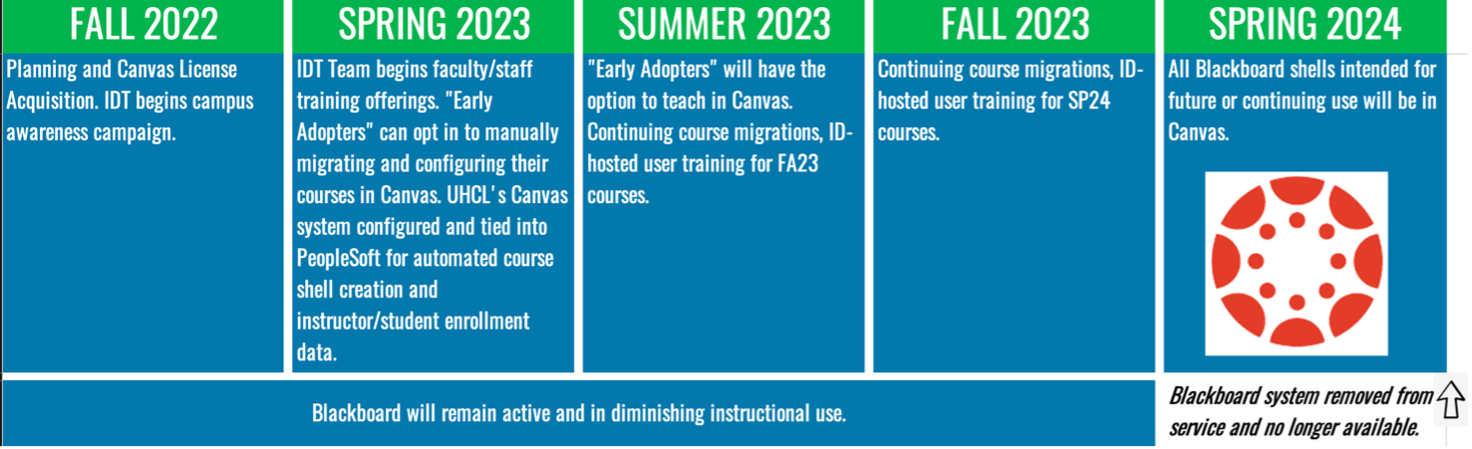
- [Document] Blackboard to Canvas: Transition Plan (October 2022) NOTE: This document is subject to change, especially in the period until the Provost makes his presentation at the November 2022 Faculty Senate meeting.
- [Video] Canvas Preliminary Transition Plan [11:48]
- [Webpage] IDT Canvas Faculty Support Page
When Can I Start Using Canvas?
Instructors cannot yet teach their UHCL classes in Canvas. However, there are several opportunities for faculty to get practice in using Canvas:
Instructors cannot yet teach their UHCL classes in Canvas. However, there are several opportunities for faculty to get practice in using Canvas:
- Volunteer to be an "early adopter" or "Canvas champion." Complete and submit the online Canvas Pilot Program form for more information or to volunteer.
- Review the IDT team's document for Canvas "early birds" to complete the following:
- Sign up for a free Canvas account and begin learning Canvas and preparing your Blackboard courses for migration in Instructure's "public" Canvas system. NOTE: Instructors must not teach their UHCL classes from this public system. Think of it as a "sandbox" space to familiarize yourself with the new LMS, import into and edit your existing Blackboard course content in Canvas, or practice building a new course "from scratch" in the new environment.
- Complete the Introducing Canvas course available on UHCL's LinkedIn Learning system. NOTE: We recommend that you obtain a free Canvas account and create a blank shell on their public system in which you can practice as you advance through the two-hour training.
- Make plans to participate in the Instructional Design and Technology (IDT) team's upcoming informational and initial Canvas familiarization sessions beginning in November 2022.
We recognize that UHCL faculty and staff may already have experience with, expertise in, or are simply eager to learn the Canvas LMS. Faculty have the option of volunteering to be a Canvas "early adopter," Canvas "champion," or both via our team's Canvas Pilot Program online request form.
- "Early Adopter:" faculty member who would like to prepare their course(s) and deliver them in Canvas before the SP24 full deployment semester. Early adopters may opt to first teach in Canvas in either the SU23 or FA23 semesters.
- Canvas "Champion:" faculty member with previous Canvas experience willing to support other instructors throughout the Canvas transition, provide regular feedback via the UTAC, and participate in Canvas informational and professional development sessions.
What Options Exist for Training/Support?
OIT's Instructional Design and Technology (IDT) team is planning a robust schedule of informational and training opportunities that will begin in late October or early November 2022. Visit the IDT team's new Canvas Faculty Support webpage for the latest resources.
This "special edition" of the IDT weekly newsletter is the first of many electronic communications to the campus to keep everyone informed over the next 18 months. Our weekly newsletter will be the primary means of electronic communication. To continue receiving those newsletters, please email IDT@uhcl.edu to opt into the newsletter mailing list. Less frequent electronic communication may originate as emails from either IDT@uhcl.edu or SupportCenter@uhcl.edu, so please keep an eye out for emails from those addresses, especially if they reference Canvas in the subject.
We invite faculty to use our "early bird" instructions document to familiarize themselves with Canvas while we finalize training and professional development opportunities. The document includes instructions for creating a free Canvas account and information about a LinkedIn Learning course that can get you acclimated to the new system.
OIT's Instructional Design and Technology (IDT) team is planning a robust schedule of informational and training opportunities that will begin in late October or early November 2022. Visit the IDT team's new Canvas Faculty Support webpage for the latest resources.
This "special edition" of the IDT weekly newsletter is the first of many electronic communications to the campus to keep everyone informed over the next 18 months. Our weekly newsletter will be the primary means of electronic communication. To continue receiving those newsletters, please email IDT@uhcl.edu to opt into the newsletter mailing list. Less frequent electronic communication may originate as emails from either IDT@uhcl.edu or SupportCenter@uhcl.edu, so please keep an eye out for emails from those addresses, especially if they reference Canvas in the subject.
We invite faculty to use our "early bird" instructions document to familiarize themselves with Canvas while we finalize training and professional development opportunities. The document includes instructions for creating a free Canvas account and information about a LinkedIn Learning course that can get you acclimated to the new system.
What’s Next?
OIT is working with the University of Houston System (UHS) to secure a contract for a UHCL-specific Canvas environment. The IDT staff is continuing our documentation efforts and setting a schedule for professional development and informational sessions beginning in November 2022.
Faculty with questions currently are welcome to contact their college's University Technology Advisory Committee (UTAC) representative or contact the Support Center to request a consultation with a member of the IDT team.
OIT is working with the University of Houston System (UHS) to secure a contract for a UHCL-specific Canvas environment. The IDT staff is continuing our documentation efforts and setting a schedule for professional development and informational sessions beginning in November 2022.
Faculty with questions currently are welcome to contact their college's University Technology Advisory Committee (UTAC) representative or contact the Support Center to request a consultation with a member of the IDT team.
Canvas Post-Announcement News (Part 1)
NOTE: The following information is also available in the IDT team's full Canvas Post-Announcement Newsletter in Sway.
The University Technology Advisory Committee (UTAC) has explored options for transitioning from Blackboard to Canvas. The process included a survey among faculty to determine the needs of the LMS as well as familiarity with Canvas. UTAC has unanimously approved a recommendation to transition to Canvas. The Provost has accepted their recommendation and will present a transition plan at the next Faculty Senate Meeting. Dr. Jana Willis, the chair of UTAC, will be one of the presenters at Faculty Assembly, and faculty are invited to ask questions about UTAC’s recommendation during the Assembly. There is much work to be done, but please join us in thanking UTAC for their hard work that led to this recommendation, as well as their work to assist in the planning of a smooth transition.
Canvas is a web-based learning management system or LMS. It is used by learning institutions, educators, and students to access and manage online course learning materials and communicate about skill development and learning achievement.
What is Canvas?
Canvas by Instructure (Canvas) is a learning management system (LMS) used to deliver 100% online courses and to support teaching and learning in face-to-face, web-support, hybrid/blended, and HyFlex courses. On Instructure's Community page, What is Canvas? they describe their product as follows:Canvas is a web-based learning management system or LMS. It is used by learning institutions, educators, and students to access and manage online course learning materials and communicate about skill development and learning achievement.
Major Improvements Over Blackboard
Blackboard and Canvas share many similarities. Both are categorized as learning management systems and are suitable for use by medium and large entities, including colleges, universities, K-12 schools, and businesses. They share a number of tools and features, although how each LMS refers to those tools and how they function differently from one another. The University of Houston’s Instruction@UH office webpage, Blackboard-to-Canvas Tool Comparison, provides a nice overview of both platforms’ major features, a brief description of differences, and links to Canvas resources about their version of each feature.Those who have never seen a Canvas course are invited to view the IDT team’s “crash course” video, Canvas "First Look" [6:07], in which we provide a brief visual comparison of the same course in both Blackboard Learn and Instructure Canvas.
Wednesday, October 19, 2022
Reminders About Available (and Possibly Misunderstood) Instructional Technologies and Capabilities
Contributed by Jenni Willis-Opalenik – Director, Technology Learning Services
Recently, the IDT team assisted the University Technology Advisory Committee (UTAC) in disseminating the university’s LMS Survey. In reviewing survey data, we saw some open-ended comments that suggest a need for more information about a few existing tools and capabilities of which some instructors are unaware.
Recently, the IDT team assisted the University Technology Advisory Committee (UTAC) in disseminating the university’s LMS Survey. In reviewing survey data, we saw some open-ended comments that suggest a need for more information about a few existing tools and capabilities of which some instructors are unaware.
- Live video classroom capabilities…to have class online and in person at the same time. Two options are available to faculty from within Blackboard while teaching: (1) Zoom integration with Zoom to set up and conduct Zoom sessions that enable virtual students to “attend” your in-person class, and (2) Echo360’s lecture capture with live streaming.
- A video assignment (recorded presentations) submission portal that reduces video size automatically. Students can use Echo360 Universal Capture: Personal to create video presentations and save them in their Echo360 Library. They can then submit their video as a hyperlink in a Blackboard assignment drop box, discussion, or another area in a course. Our team has created a short “crash course” video, Student Presentations Using Echo360, for students on all of these Echo360 topics.
- I would like to see the data on student time spent within the course each day or week. Blackboard provides two options for faculty interested in student activity and performance data within a Blackboard course. For more information, you may want to review Blackboard’s support pages on Course Reports and the Retention Center.
- Download the Blackboard exam into Microsoft Word. I’m not sure whether this request references downloading a blank copy of an exam to Word for in-person use, or whether the instructor wants to be able to download students’ completed online exams to Word for offline grading. If the request is in reference to the first option, the IDT team’s staff can assist you. Simply email the Support Center to request assistance and your inquiry will be routed to our team. An instructional designer or learning technology administrator will be assigned to use Respondus Exam 4.0 to extract your online exam from Blackboard into a Word exam and answer key. Regarding the second option, we do not have a solution for that request available at this time.
- A product like Studio for video storage, and the capabilities to create video interactive quizzes. The university acquired Echo360 several years ago, and the IDT team continues to promote awareness of and provide training on that application for the following features: (1) video lecture/presentation recording, (2) storage for audio/video contents created in Echo360 or Zoom, or imported from another source, (3) modification of videos stored in Echo360 to include embedded questions for students to answer as they watch the video, and (4) accessing student viewing and response data. Please refer to the following IDT resources for more information on these features:Promoting Active Engagement with Within-Video Polls/Questions
- Video: Setting Zoom to Work with Echo360 [2:55]
- Video: Basic Upload to Echo360 [3:59]
- Video: Echo 360 Basics [13:31]
- Additional Echo360-related videos are available on the IDT team’s blog post, "Crash Course" Video Library.
- I would like to be able to add comments on written work that students can access without my having to download and save a file that I have to post back…Even better would be the ability to offer spoken comments that are recorded by the system. Blackboard provides some degree support for both of these requests. For more information, you may want to review Blackboard’s support pages on Assignment Inline Grading and Record Audio and Video Feedback.
- Creating tests in Blackboard is so painful that the thought of having to recreate the tests used in my lab classes is making me nauseous. Most were developed when the university had a license for Respondus 4.0, which greatly facilitated setting up automated tests, but since losing that option, the one or two quizzes I've had to create or modify have been tremendous time holes. UHCL still has Respondus Exam 4.0. However, when we needed to implement single sign-on (SSO) security protocols, making a connection between Respondus Exam 4.0 and Blackboard became problematic and frustrating. However, the IDT team regularly assists faculty with getting exam questions from a Word document into the Blackboard course(s) via Respondus. Simply email the Support Center and request that assistance. Your inquiry will be sent to the IDT team, and one of our Instructional Designers will be assigned to help you. For those faculty of a more “do it yourself” approach, we do have a DIY workaround that enables you to upload questions from a Word document into a Respondus exam, exporting/downloading the test from Respondus as a Blackboard-ready exam file, and importing that file into the Tests, Surveys, and Pools area in your Blackboard course. For more information about the workaround, please review the IDT team’s “crash course” video, Respondus Exam – Manual Workaround [5:49].
In addition to the specific resources referenced above, the IDT team encourages you to contact the Support Center to request more information about these features, or about anything related to instructional design and instructional technologies. You may do so by email at SupportCenter@uhcl.edu or by telephone at (281) 283-2828.
Subscribe to:
Posts (Atom)